Project
Solution Explorer
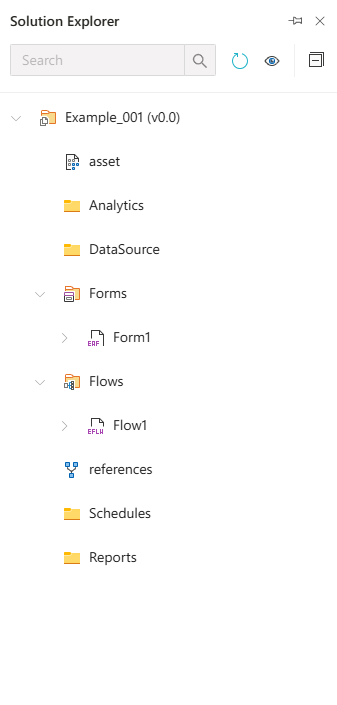
Solution Explorer is a panel in Synergy IDE that displays all project components hierarchically, making it easier to manage project content. The components are organized into categorized folders.
Main Folders and Their Contents:
asset
Contains general project assets such as images, script files, etc.Analytics
Contains data analysis components. May support reports or data visualization modules.DataSource
Stores data sources used in the project, such as SQL connections or API endpoint definitions.Forms
Contains user interface forms created in the project.- Each form is listed as a separate file (e.g.,
Form1).
- Each form is listed as a separate file (e.g.,
Flows
Section where workflows are defined.- Each flow is represented as a separate file (e.g.,
Flow1).
- Each flow is represented as a separate file (e.g.,
references
It retrieves the references of NuGet packages generated from the project's source code.Schedules
The section where scheduled tasks are defined. You can configure when and under what conditions tasks will run.Reports
Contains custom reports created and stored for the project.
Usage Tips:
- Use the
search barat the top left to quickly search through folders and files. - Refresh, view, and pin icons are located at the top of the panel.
- Right-click on folders to add new items (new form, new flow, etc.).
- All files can be viewed using Show All Files.